Usoda!!!
1k views · started by gotxbrain ·

I like that.
Nice, I like it to. 
I'm not really sure what you want us to say. You used a ref picture and drew the exact same thing, which while it's still art really isn't something I feel like is even worth commenting on. It really takes very little talent eyeball a animu picture.
It's sketchy, the lines are off, but I will say it does look close to the original and is a decent picture. My suggestion is stop using weeaboo faggot animu pictures as references until you can get your anatomy down. If you ever want to get better I suggest using refs of RL people. Not say all anime pictures are bad but until you get better I don't suggest using them. Lol at not really having eyebrows.
It's sketchy, the lines are off, but I will say it does look close to the original and is a decent picture. My suggestion is stop using weeaboo faggot animu pictures as references until you can get your anatomy down. If you ever want to get better I suggest using refs of RL people. Not say all anime pictures are bad but until you get better I don't suggest using them. Lol at not really having eyebrows.
I usually draw my own pictures actually. I was just rereading some old manga and thought 'man i wanna draw that' so I did. I haven't drawn in a while so I'm just getting into the swing of it again. You know me, clover! I don't usually copy other things, but it's good practice every once in a while, especially for your hand-eye coordination. (lame excuse)
I'm still working on it, I guess.... I turned this into a practice for lineart. I didn't use the vector tool this time! I think i'm getting better at this part.

I'm still working on it, I guess.... I turned this into a practice for lineart. I didn't use the vector tool this time! I think i'm getting better at this part.
It's starting to look a lot nicer now at least. Oh and I understand it's sometimes good every once and while and it can be a fun way to pass the time as well. 
What program are you using for your line art if I can ask? It seems sort of... pixel-y? Looks good though.
What program are you using for your line art if I can ask? It seems sort of... pixel-y? Looks good though.
I'm using Sai. It looks pixel-y maybe because I did it by hand, so it's still a little rough.

finished the colors, yay!
That looks pretty good.
I tried to do what you did but always fail.
I tried to do what you did but always fail.
Minora wrote:I'm using Sai. It looks pixel-y maybe because I did it by hand, so it's still a little rough.
Which tool are you inking it with? And what do you mean by hand? With a tablet or mouse? Because doing it "by hand" is a very confusing term. If you're talking about just using a tablet and lining it by hand with out using and sort of vector tool then that's what I normally do. Lol XD If you mean with a mouse or touch pad I suggest using vector layers.
Try using these either of these settings next time you ink and see if it helps.
Keep in mind the shapes just below your tools, the one that looks like a hill makes it so what ever tool you're using is more round and soft.
The box makes it sharper and more "square".
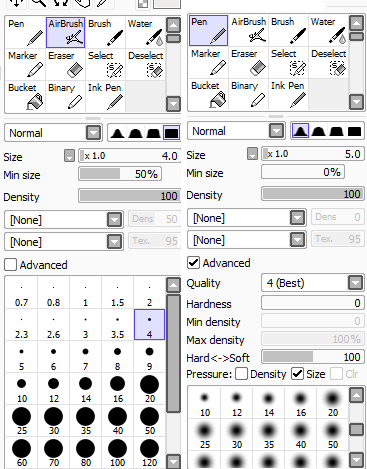
Feel free to play around with it but that's what I use when I do line art. =P
Another thing you can do is depending on which version of sai you have, you can change your smoothing settings. I usually keep mine around 7.

Also something else that can be helpful are vector layers in sai.
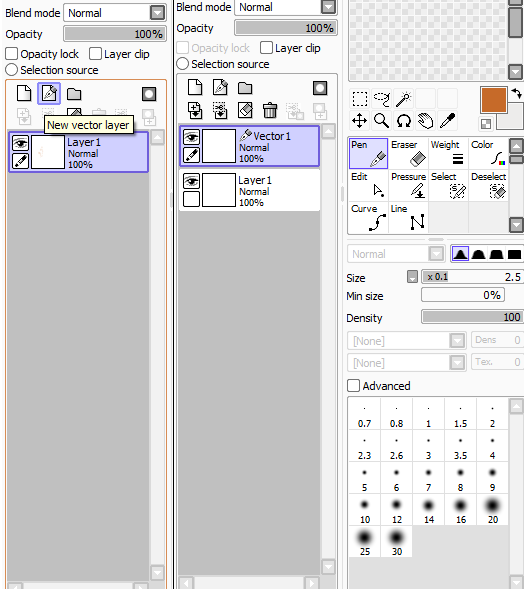
I'm still getting use to them myself but the work really well for clean lines.
Here is a video that I found helpful showing you how to use the pen tool in a vector layer.
Hope this helps!
ah, sorry. I see how 'by hand' could be confusing. when i said that i meant using a tablet, so my lines were still a little sketchy instead of the pristine lines of the vectors...
thanks for the info though! I did realize my pen settings (not the vector pen) were on the block shape and not the hilly one.
thanks for the info though! I did realize my pen settings (not the vector pen) were on the block shape and not the hilly one.
Minora wrote:ah, sorry. I see how 'by hand' could be confusing. when i said that i meant using a tablet, so my lines were still a little sketchy instead of the pristine lines of the vectors...
thanks for the info though! I did realize my pen settings (not the vector pen) were on the block shape and not the hilly one.
Haha, no problem! With enough practice though you'll be able to to make smoother lines even with out a vector.
that's why I'm practicing X3
I have a suggestion. The eye's came out looking a little blurry. Did you use the dodge tool or did you add color manually? I'd recommend you picking the colors yourself and if you notice in the reference, the eyes have sharp lines on the outside of the color part of the eye. Other than that, nice job. Anytime I try to copy things they always come out way different.