[TuT] Making a Account creator.[TuT]
How hard is this?: 1-10 1 2 |3| 4 5 6 7 8 9 10
What you will need for the layout:
- 2 Buttons. - Name them Button1-Add Info/Whatever. Button2-Close.
- 4 Textboxes
- 1 Web browser
Instructions:
1. Nexon Passport Sign-Up
Add this to you web browsers URL or use your own.
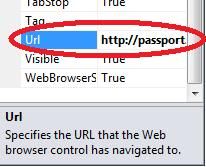
2. Right click on the page and click view page source code.
3. Look for the txtAccountID/Whatever it is on your site.
4.Find all of the IDs/Whatever it is on your site, for Nexon it is:
txtAccountID
txtPassword
txtPasswordConfirmation
txtEmail
txtEmailConfirmation
txtFirstName
rbGenderMale - This is for the gender.
chkTermofuse
chkTermofuse - This is for the agreement of the site.
ddlBirthDay - Day of birth.
ddlBirthYear - Year of birth.
ddlBirthMonth - Month of birth.
5.Code it. " Button 1"
Codes:
"Button 2"
Code:
Thank me if i helped.
+Rep if you care.
What you will need for the layout:
- 2 Buttons. - Name them Button1-Add Info/Whatever. Button2-Close.
- 4 Textboxes
- 1 Web browser
Instructions:
1. Nexon Passport Sign-Up
Add this to you web browsers URL or use your own.
2. Right click on the page and click view page source code.
3. Look for the txtAccountID/Whatever it is on your site.
4.Find all of the IDs/Whatever it is on your site, for Nexon it is:
txtAccountID
txtPassword
txtPasswordConfirmation
txtEmail
txtEmailConfirmation
txtFirstName
rbGenderMale - This is for the gender.
chkTermofuse
chkTermofuse - This is for the agreement of the site.
ddlBirthDay - Day of birth.
ddlBirthYear - Year of birth.
ddlBirthMonth - Month of birth.
5.Code it. " Button 1"
Codes:
WebBrowser1.Document.GetElementById("txtAccountID").SetAttribute("value", TextBox1.Text)
WebBrowser1.Document.GetElementById("txtPassword").SetAttribute("value", TextBox2.Text)
WebBrowser1.Document.GetElementById("txtPasswordConfirmation").SetAttribute("value", TextBox2.Text)
WebBrowser1.Document.GetElementById("txtEmail").SetAttribute("value", TextBox3.Text)
WebBrowser1.Document.GetElementById("txtEmailConfirmation").SetAttribute("value", TextBox3.Text)
WebBrowser1.Document.GetElementById("txtFirstName").SetAttribute("value", TextBox5.Text)
WebBrowser1.Document.GetElementById("rbGenderMale").InvokeMember("Click")
WebBrowser1.Document.GetElementById("chkTermofuse").InvokeMember("Click")
WebBrowser1.Document.GetElementById("ddlBirthDay").SetAttribute("value", "4")
WebBrowser1.Document.GetElementById("ddlBirthYear").SetAttribute("value", "1975")
WebBrowser1.Document.GetElementById("ddlBirthMonth").SetAttribute("value", "4")
"Button 2"
Code:
Me.close
Thank me if i helped.
+Rep if you care.


 +Rep
+Rep